One venue. The right workspace for its customers.
Walk-in queues
For barbers, salons and clinics. Manage who is next, call customers and record service.
Walk-in operations guideOrder collection
For takeaway shops and cafés: customers track paid orders by receipt number, and staff mark them ready.
Collection operations guideYour queue, running in real time.
This is what your team sees every morning.
Daily controls and queue summary
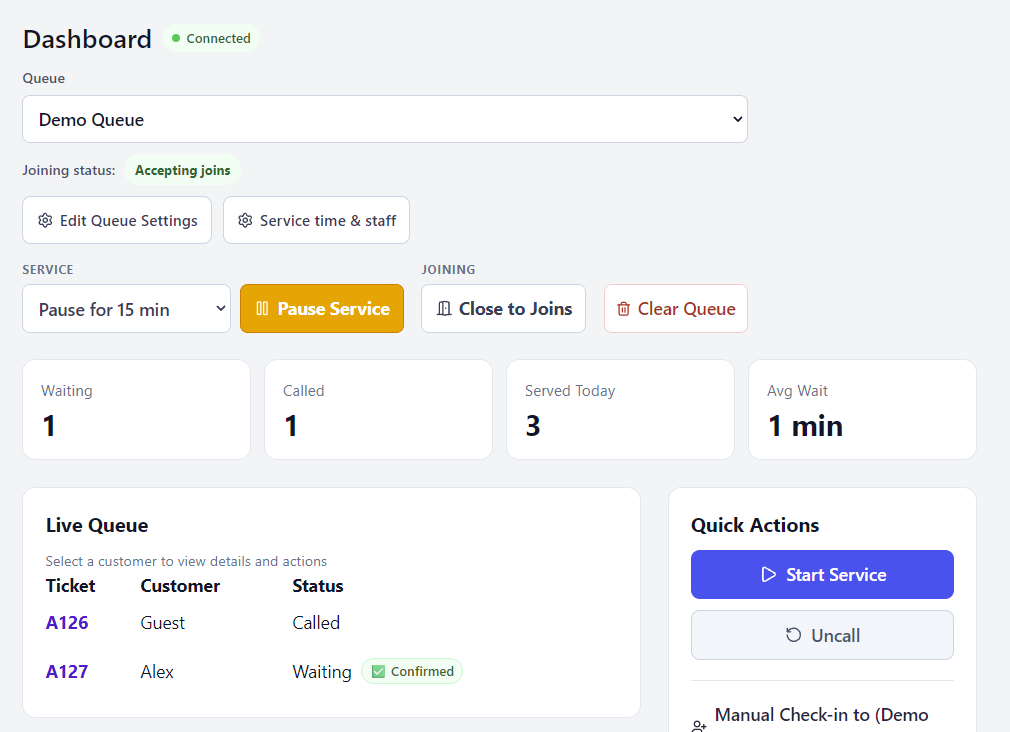
Live queue detail
The dashboard brings live tickets and daily controls together. The A127 confirmation is visible to staff beside the waiting ticket.
Example using demo data · Captures show different moments in the demo account.View full-size screenshot (opens in a new tab)Three ways in. One queue.
Offer online joining, QR codes at the venue and assisted check-in. Customers can follow their place while spending time nearby, and your team sees the arrivals in its working queue.
Help customers return for their turn
QueueFinder can alert the next waiting customer and ask them to confirm I’m coming. Your team can see the response, while stay-nearby guidance helps customers know when to remain close.
Alerts use browser notifications. Customers allow notifications, then get pinged automatically when their turn approaches on supported devices.
How alerts work
Notifications need customer permission and device support. On iPhone or iPad, customers also add the site to their Home Screen. Customers can open their ticket at any time to see its latest status; delivery and sound depend on browser and device settings.
Keep the working day moving
Use automatic calling to bring the next customer forward, or call tickets yourself. Pause and resume service for a break, close new joins when needed, and adjust service time and staffing as the day changes.
If a customer misses their turn, record a no-show. When they return, requeue an eligible ticket at the end of its queue.
See every venue on one pageMulti-venue
My venues gives organisation owners a combined view of accessible locations and opens the workspace each venue uses. Walk-in figures show who is waiting, called or being served, plus served-today totals. Collection activity appears in each venue’s separate dashboard and Collection reports.
See what’s working. Fix what’s not.
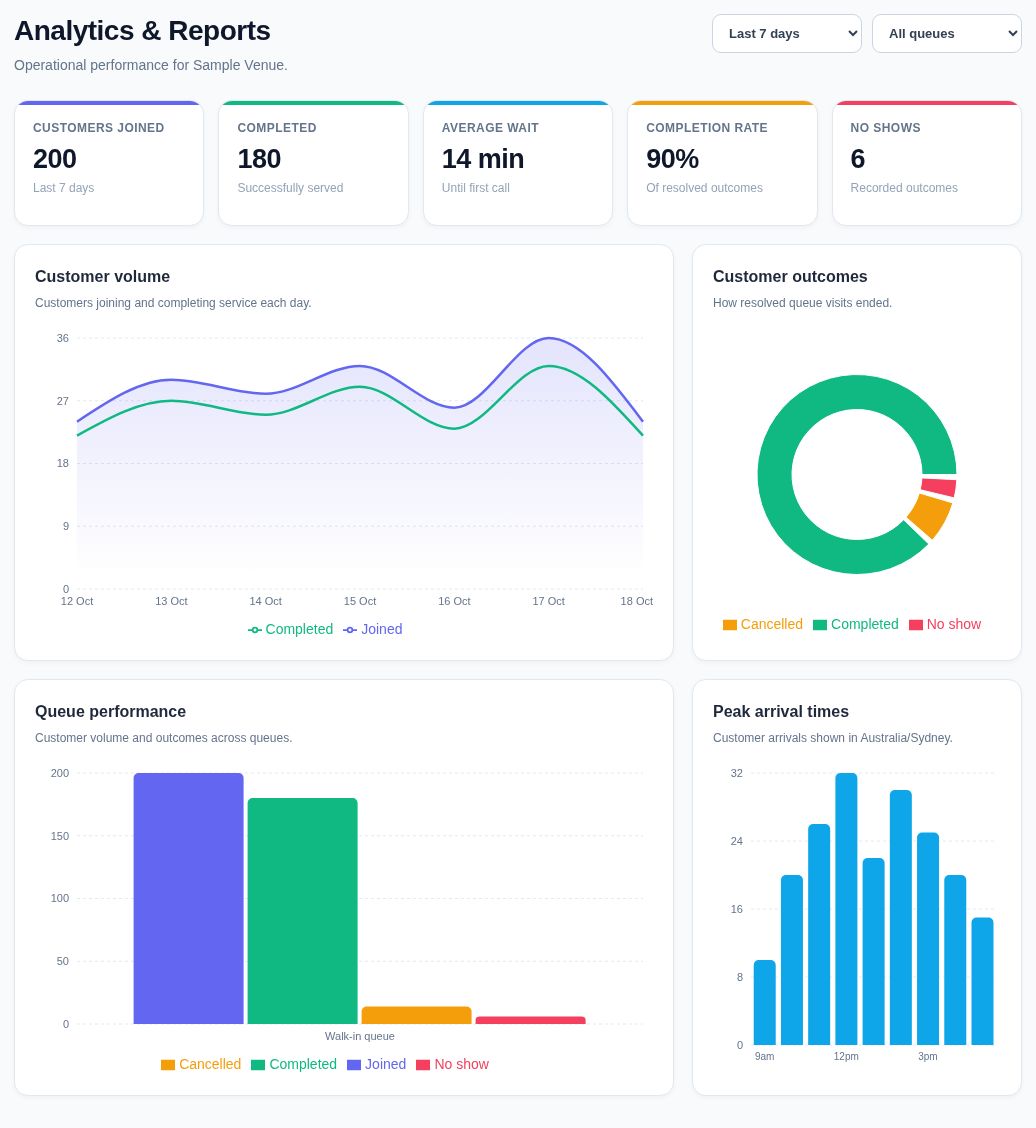
Advanced Analytics & Reports shows joins, completed services, cancellations and recorded no-shows. Compare queues and peak arrival times using the available 7-, 30- and 90-day ranges.
Cancellations and recorded no-shows are separate outcomes for customers who joined. Use the reporting guide to understand what each figure includes.
See demand and outcomes clearly
A closer look at the summary cards and charts from a sample venue’s report.
Customer volume
Customer outcomes
See customer activity and how queue visits ended with Advanced Analytics & Reports. Open the full screenshot to see queue performance, peak arrival times and the reporting filters.
Illustrative sample data · 200 joined · 180 completed · Last 7 days · All queues. Not a customer performance claim.View full-size screenshot (opens in a new tab)Turn receipt numbers into collection alerts
Take the order and payment in your usual till. The customer scans your collection QR and enters their receipt number; their ticket appears in Live orders. When the food is ready, staff select Ready for collection on the matching ticket. There is no separate staff order-entry step.
Give customers a convenient alternative to waiting at the counter for a shouted number or a food buzzer. Keep calling as usual for customers who do not register or enable alerts. QueueFinder works alongside your till; it does not connect to the POS or take orders and payments.
See live collections and keep handover simple
Waiting, Ready and uncollected Expired tickets stay together in one compact view. Staff can mark Collected, correct an accidental Ready with Not ready, and close tracking when needed. Duplicate receipt numbers have separate Ticket A/B identifiers so the team can check receipts before handover.
Owners and managers can Pause registrations while existing tickets stay usable, and choose the Ready collection window—15 minutes by default. Collection reports show registration outcomes and aggregate CSV exports, including collections after expiry. These figures cover voluntary registrations, not every till order or confirmed no-shows.
Fit the queue around your services
Choose Walk-in queues, Order collection, or Both, and give team members access to the venues they work at. The workflows have separate dashboards, QR codes and reports.
A few ways businesses use QueueFinder
Barber
One walk-in haircut queue. Customers wait nearby while the team calls tickets and records service. Update four simultaneous barbers to three when someone is absent.
Nail salon
Different manicure and pedicure queues, with service durations and staffing that match each service. Compare demand and arrival patterns in reports.
Walk-in practice
Reception manages arrivals and practitioner queues alongside existing practice systems. QueueFinder does not provide medical records, clinical triage or appointment booking.
Fish and chip shop
Customers order and pay, then scan the collection QR. They can find a nearby table while their fish cooks and return when staff mark their receipt number ready.
Start free with one venue
One free venue with Walk-in queues, Order collection, or both. Includes unlimited queues, staff accounts and check-ins, plus Advanced Analytics. No credit card required. Multi-venue: First venue free. Additional venues US$19/month each. Add paid venues from your dashboard. Prices in Australia are A$29/month and in New Zealand NZ$35/month per additional venue. Any applicable tax is shown at checkout.
Plan details
QR flyers include QueueFinder branding.